I have a dual boot setup between Windows and Linux, and I work with web servers on both of those systems. I often find myself killing processes that own a certain port. While it is trivial to do on Linux with fuser port/tcp, I have to google this abhorrent powershell command everytime I need to do this on Windows:
Get-Process -Id (Get-NetTCPConnection -LocalPort <port>).OwningProcess
That's when I thought I should make a cross-platform port killer tool, so that I can get a consistent command on both Linux and Windows. I also wanted to write the tool from scratch, and not shell out commands to existing tools. This way, I'd learn about how it actually works under the hood. Performance was not the initial concern, but you'll soon find how it turned out to be 8x faster than fuser and 4x faster than lsof. This blog intends to cover the port-to-process discovery and termination semantics on both these operating systems, and some performance optimizations I did to make the tool even faster.
For the impatient, here's the repo. The tool is named rekt.
Linux
Collecting Inodes
My initial assumption was that both Linux and Windows might expose some syscall that allows us to discover the process ID of the port-occupying process directly. While I was kinda right with this assumption with Windows, I couldn't be more wrong with this on Linux.
Linux exposes a virtual file system named /proc which represents the current state of the kernel. A lot of information about the hardware and currently running processes are present in this directory. A sub-directory named net contains information about networking parameters and statistics. Under this directory, four files are of importance to us: /proc/net/{tcp,tcp6,udp,udp6}. These files contain the kernel socket table. The four files are differentiated by the transport layer and the internet layer the sockets inside them are operating on.
Here's how a socket table entry looks like: (from /proc/net/tcp)
sl  local_address rem_address   st tx_queue rx_queue tr tm->when retrnsmt   uid  timeout inode
0: 3600007F:0035 00000000:0000 0A 00000000:00000000 00:00000000 00000000   193        0 26626 1 000000000cde931e 100 0 0 10 5
From this table, the local_address, st (state) (both hex-encoded) and inode are critical to finding out the process owning the port.
An inode, short for "index node," is a data structure that stores most of the essential information about a file or directory. The inode doesn't include the file's name or its data. It contains other attributes such as file size, device ID, user ID (UID), group ID (GID), file mode, timestamps, links count, and pointers to data blocks. Each file has a unique inode number. Each socket owns an inode.
The state of a socket represents the state of the TCP/IP state machine. You can learn about its possible values here. The ones we want to target are ESTABLISHED (0x01), SYN_SENT (0x02), LISTEN (0x0A), CLOSE_WAIT (0x08).
The algorithm is then to parse this table, and from each entry collect the local_address, st and inode. If the socket state matches the ones mentioned above and the local address has the hex encoded port we're looking for, we store the corresponding inode.
Scanning Process FDs
The /proc directory also exposes information about the currently running processes. Each process has a subdirectory after its PID. Linux also tracks the currently open file descriptors for the process. Since sockets are also files, they are also tracked.
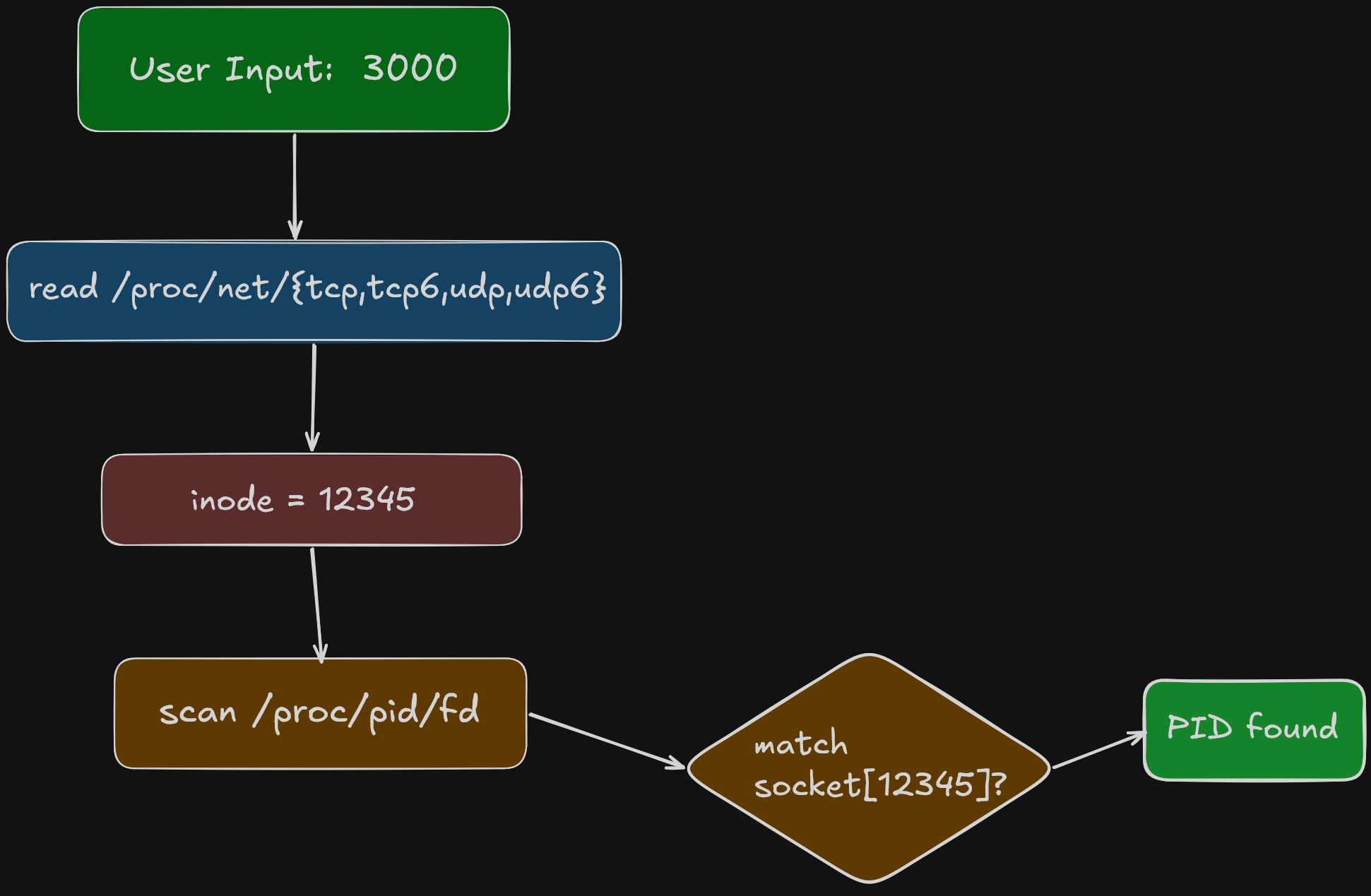
Thus, we need to recursively scan the /proc directory for all processes and check the file descriptors. If the file descriptor looks like socket:[%d], we can match it against the previously connected inodes. If it matches, we have found the process that owns this inode (and hence the port).
Here's a flowchart which visualizes the entire process:
SO_REUSEPORT
You might think that we stop at the first PID that matches the collected inode, but that's not the case. One of the socket creation options include SO_REUSEPORT, which allows multiple processes to share the same port. The kernel load balances the incoming traffic onto the processes when this option is enabled. This is why we must keep scanning the processes until they are exhausted, even if we've already found a match.
Optimizations
When I built the first version of rekt, I wanted to benchmark it against fuser just to know how it stands against the giants. To my surprise, the implementation was already quadruple as quick as fuser. I was really happy to see this, and decided to optimize it further.
A quick profile later, it turned out that most of the time was spent on scanning the process FDs. I made it concurrent using a bounded worker pool. I also optimized the socket table parsing and reduced some string allocations. The efforts were worth it, since rekt was now 2x faster than its olf self.
Verbose output
I also added a verbose output feature in v0.2.0. It displays the process name, owner and its type (TCP/UDP, IPv4/6) information. The process name and owner are fetched from /proc/<pid>/status file and socket type information from the net file the inode is read from.
Termination
Once the process is found, the user can either terminate or kill it. The implementation is very simple, just use os.FindProcess and send either SIGTERM or SIGKILL signal to the process, depending on the flags passed (kill is chosen if both the flags are passed). SIGTERM is a polite exit request and allows the process to exit gracefully, by cleaning up any resources it might have opened in its lifecycle. The process can ignore this signal, which is why SIGKILL exists. It requests the kernel to destroy the process immediately.
When using rekt, it is suggested to use termination over killing, and resort to killing the process only when it's unresponsive to termination.
Random trivia: Sending a signal 0 can check the existence of a process.
Windows
As I mentioned earlier, the port-to-PID information is exposed via a function on Windows, specifically the iphlpapi.dll (IP Helper API) library. It has two high level functions, GetExtendedTCPTable and GetExtendedUDPTable.
Here's what the TCP with IPv4 table entry looks like:
type mibTCPRowOwnerPID struct {
	state      uint32
	localAddr  uint32
	localPort  uint32
	remoteAddr uint32
	remotePort uint32
	owningPID  uint32
}
Again, we just need to match the relevant state and localPort, and get the owningPID directly. The implementation however, was difficult, since it was my first time interacting with Windows APIs in Go. This official wiki was very helpful. I didn't bother optimizing much on Windows since just having this tool work on Windows was good enough than working with powershell. I suppose there isn't much scope either, since it's comprised of just calling the library functions.
SO_REUSEPORT
This socket option is not supported on Windows, but SO_REUSEADDR on Windows acts like it. Handling it involves processing the entire table instead of stopping at the first match.
Verbose output
Verbose output on Windows involves calling library functions again, except this time I don't have to manually load the library and call the processes. I used the windows package and used QueryFullProcessImageName function to get the executable path and some process token stuff for owner information.
Termination
The termination and kill behavior is identical on Windows, since there is no concept of signals here. Two syscalls are made: OpenProcess which returns a process handle and TerminateProcess which takes the handle and kills the process.
Benchmarks
rekt is consistently 8x faster than fuser and 4x faster than lsof.
Here are results from a run on my PC.
| Command | Runs | Average [ms] | Min [ms] | Max [ms] | Relative |
|---|---|---|---|---|---|
rekt 8000 |
690 | 3.92 ± 0.40 | 3.33 | 5.66 | 1.00 ± 0.00 |
lsof -i :8000 |
179 | 16.74 ± 3.23 | 14.42 | 38.14 | 4.27 ± 0.93 |
fuser 8000/tcp |
97 | 32.00 ± 2.36 | 29.62 | 38.94 | 8.16 ± 1.03 |
This is not a truly fair benchmark since those tools are capable of doing much more than just port killing, while rekt is a specialized tool.
Here's a comparison on Windows.
| Command | Mean [s] | Min [s] | Max [s] | Relative |
|---|---|---|---|---|
Get-Process -Id (Get-NetTCPConnection -LocalPort 8000).OwningProcess |
1.007 ± 0.056 | 0.911 | 1.064 | 285.63 ± 707.67 |
netstat -aon | findstr 8000 |
0.042 ± 0.013 | 0.022 | 0.063 | 11.95 ± 29.84 |
rekt 8000 -v |
0.004 ± 0.009 | 0.000 | 0.027 | 1.00 |
You can find more information about how these benchmarks were carried out from the readme.